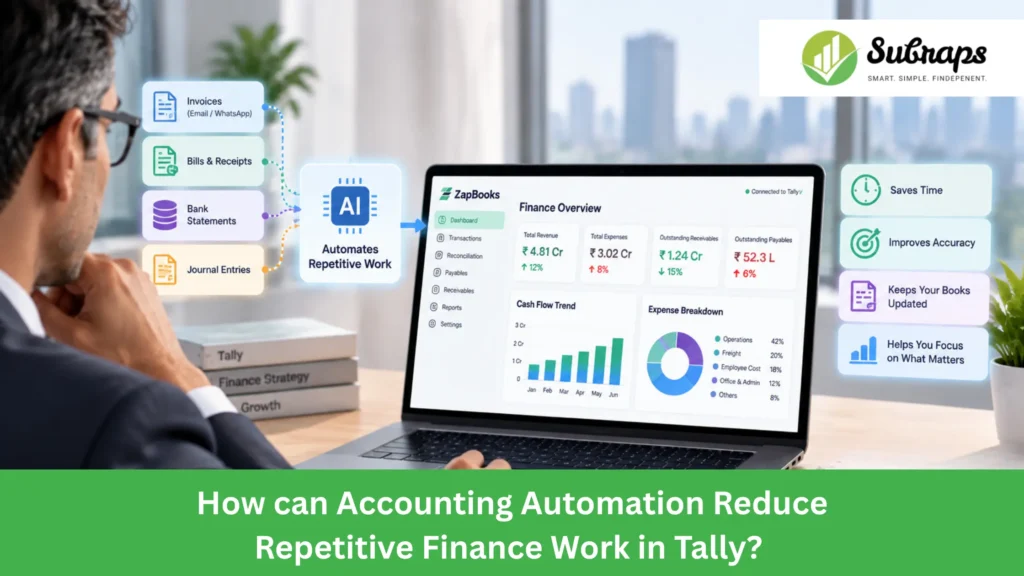
Finance teams may already use Tally every day, but managing a growing number of transactions can still become time-consuming.
Invoices keep coming in. Details need to be entered, vendors and ledgers need to be checked, tax information needs to be verified, and approvals need to be completed before the transaction reaches the books.
For finance teams, the real challenge is not managing accounting records. It is reducing the manual effort required to keep those records updated.
Can accounting automation help reduce this manual effort while keeping finance control in place? Yes.
In this blog, we will look at how accounting automation reduces repetitive finance work in Tally and how ZapBooks helps businesses simplify these everyday accounting processes.
What is Accounting Automation?
Accounting automation is the process of using technology to simplify repetitive finance activities such as capturing documents, preparing accounting information, managing approvals, and recording transactions in the accounting system.
Instead of manually handling every step, automation helps finance teams create a more structured workflow where information is prepared, reviewed, and processed with less repeated effort.
It does not replace the finance team or remove the need for human review. Accountants still need to verify entries, handle exceptions, apply accounting knowledge, and ensure the books remain accurate.
For a Tally-based finance team, accounting automation can simplify the process:
Receive Document → Prepare Accounting Details → Review & Approve → Post to Tally
Why does Repetitive Finance Work Become Difficult as a Business Grows?
As a business grows, finance teams do not just handle more transactions; they also have to manage more checks, approvals, and follow-ups before every entry reaches the books.
What works for a smaller volume of invoices and payments can become difficult when the number of vendors, documents, and daily transactions increases.
A growing finance team may spend more time on routine tasks such as:
- Collecting invoices from emails, WhatsApp, and different sources
- Entering transaction details into the accounting system
- Checking vendor, ledger, and tax information
- Following up for approvals
- Tracking pending documents and entries
- Correcting incomplete or incorrect information
- Ensuring approved transactions are updated in Tally
The challenge is not only handling more transactions. It is the repeated manual effort required at every step.
As this continues, finance teams may spend more time maintaining records and less time focusing on financial analysis, cash flow reviews, reporting, and business decisions.
Which Repetitive Finance Tasks in Tally can be Simplified with Accounting Automation?
Accounting automation can simplify several repetitive tasks that finance teams handle before and during the accounting process in Tally.
Invoice and Document Capture
Collecting invoices from emails, WhatsApp messages, and different folders can take time and make tracking difficult.
Accounting automation helps bring documents into a structured workflow, making it easier to capture invoice details and prepare them for finance review.
Accounting Data Extraction
Manually entering invoice details such as vendor name, amount, tax information, and other fields can be repetitive.
Automation helps extract important information from documents and prepare it for review, reducing the need for repeated manual data entry.
Vendor and Ledger Mapping
Every transaction needs to be connected with the correct vendor, ledger, and accounting category.
Automation helps prepare this information more consistently, making it easier for finance teams to review and process entries before they reach Tally.
GST and TDS Checks
Tax-related checks are an important part of accounting but can require significant manual effort.
Accounting automation helps organize GST and TDS-related information during the transaction process, making review easier before posting entries.
Review and Approval
Finance teams need proper checks before transactions are recorded in the books.
Automation helps create a structured approval process where entries can be reviewed, verified, and approved before they are posted.
Posting to Tally
Once transaction details are reviewed and approved, automation can help move the approved information into Tally through a controlled process.
This reduces repeated manual entry while keeping finance teams involved in reviewing and managing the books.
Manual Finance Work vs Accounting Automation in Tally
The difference becomes clearer when we compare how finance teams handle routine accounting tasks manually and with accounting automation.
| Finance Task | Manual Process | With Accounting Automation |
| Document Collection | Collect invoices from emails, WhatsApp, and different folders manually | Capture documents through a structured process and prepare them for finance review |
| Data Entry | Read invoice details and enter information manually into Tally | Extract important details and prepare them for finance review |
| Vendor and Ledger Checks | Check vendor details, ledger names, and transaction information manually | Organise accounting details for easier verification before posting |
| GST/TDS Checks | Review tax information separately for each invoice | Keep tax-related details organised during the accounting process |
| Approval Process | Follow up with teams through emails or messages for approvals | Move entries through a defined review and approval process |
| Tally Posting | Create vouchers manually after completing all checks | Post approved transactions into Tally through a controlled workflow |
| Tracking | Track documents, approvals, and entries across different places | Maintain a clearer process from document capture to final posting |
The goal of accounting automation is not to remove accountants from the process. It helps reduce repetitive work like collecting documents, entering details, and following up on approvals, so finance teams can focus more on review and accuracy.
What are the Benefits of Accounting Automation for Tally Finance Teams?
The value of accounting automation is not only about processing transactions faster. It helps finance teams reduce repetitive work, improve control, and spend more time on important financial activities.
Reduce Repetitive Data Entry
Finance teams often spend significant time entering invoice and transaction details manually.
Accounting automation helps prepare information before review, reducing repeated typing work and making high-volume transaction processing easier to manage.
Improve Review and Accuracy
Instead of checking every detail from the beginning, finance teams can review structured information before transactions are recorded.
This creates a more organized process where important details such as vendor information, ledger details, and tax information can be verified before posting.
Improve Control Over Accounting Entries
Accounting automation creates a structured process where transactions can be reviewed and approved before they reach the books.
This helps finance teams maintain better control over what information is added to Tally.
Simplify Approval Workflows
Following up on approvals manually can slow down accounting processes.
A defined approval workflow helps teams track pending entries and complete reviews in a more organised way.
Focus More on Financial Review
By reducing repetitive tasks like document handling, data entry, and follow-ups, accounting automation gives finance teams more time to focus on activities that require professional judgment.
This includes reviewing financial performance, cash flow statement analysis, handling exceptions, reconciliation, reporting, and maintaining better financial control.
How does ZapBooks Support Accounting Automation in Tally?
ZapBooks is an AI-powered automation platform built for Tally users to simplify repetitive finance work and improve accounting workflows.
It helps finance teams organize tasks such as document capture, accounting data preparation, review, approvals, and posting into a structured process.
Document Capture → AI Data Extraction → Staged Draft → Finance Review → Approval → Tally Posting
Tally continues to remain the core accounting system, while ZapBooks adds automation and workflow control around repetitive finance activities.
Once accounting information is organized in Tally, finance teams can also use the same data for better reporting and review.
It also helps teams review Tally data through financial reports such as P&L, cash flow, ratios, and receivables for better financial visibility.
ZapBooks is developed by Subraps as part of its finance and accounting automation solutions, helping businesses simplify accounting processes and improve financial visibility from Tally data.
Conclusion
Tally helps businesses maintain accounting records, but finance teams may still spend time on repetitive tasks like document handling, data entry, and approvals.
Accounting automation helps simplify these processes while keeping finance teams in control. ZapBooks works alongside Tally to reduce repetitive finance work and help businesses get more value from their financial data.
Want to simplify your accounting workflow in Tally? Book a free consultation with the Subraps team to explore how automation can support your finance operations.
